Vitess
vitess是Google开发的可伸缩、可靠的、兼容MySQL的云原生分布式数据库。
vitess最初由谷歌开发来支持youtube, 而youtube已成为全球第二大网站,有海量的视频上传和用户访问, 足以说明该方案的可靠性。
为什么要分库分表?
通常情况下,单库单表的方式就可以支撑绝大多数场景。
如果流量较高,使用读写分离的方式也可以缓解数据库压力(一般读的流量比写高很多)。
但如果记录有千万以上(或根据实际业务情况判断),当单机容量不够或单节点读写出现性能瓶颈时,就可以考虑分库分表来拆分流量了。
分库分表方案
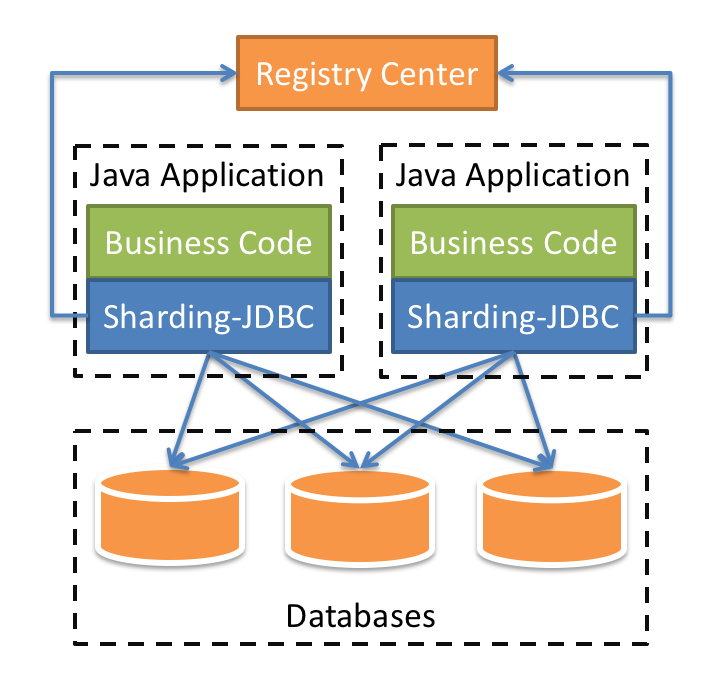
通常分库分表有Embedded-SDK模式和Proxy模式。
Embedded SDK模式的优点是,其部署架构更加简单,且去中心化。
代表性的方案如sharding-jdbc, mycat等.
Proxy模式则对应用提供了类似标准JDBC或者DB SQL连接的方式,给应用开发者的感觉就是直接连数据库一样,基本不用关注实现细节。而且Proxy模式比较容易定制监控/自动扩缩容方案,因此运维成本一般较低。以及在代理层实现连接复用提高io性能。
代表性的方案如vitess, sharding-proxy
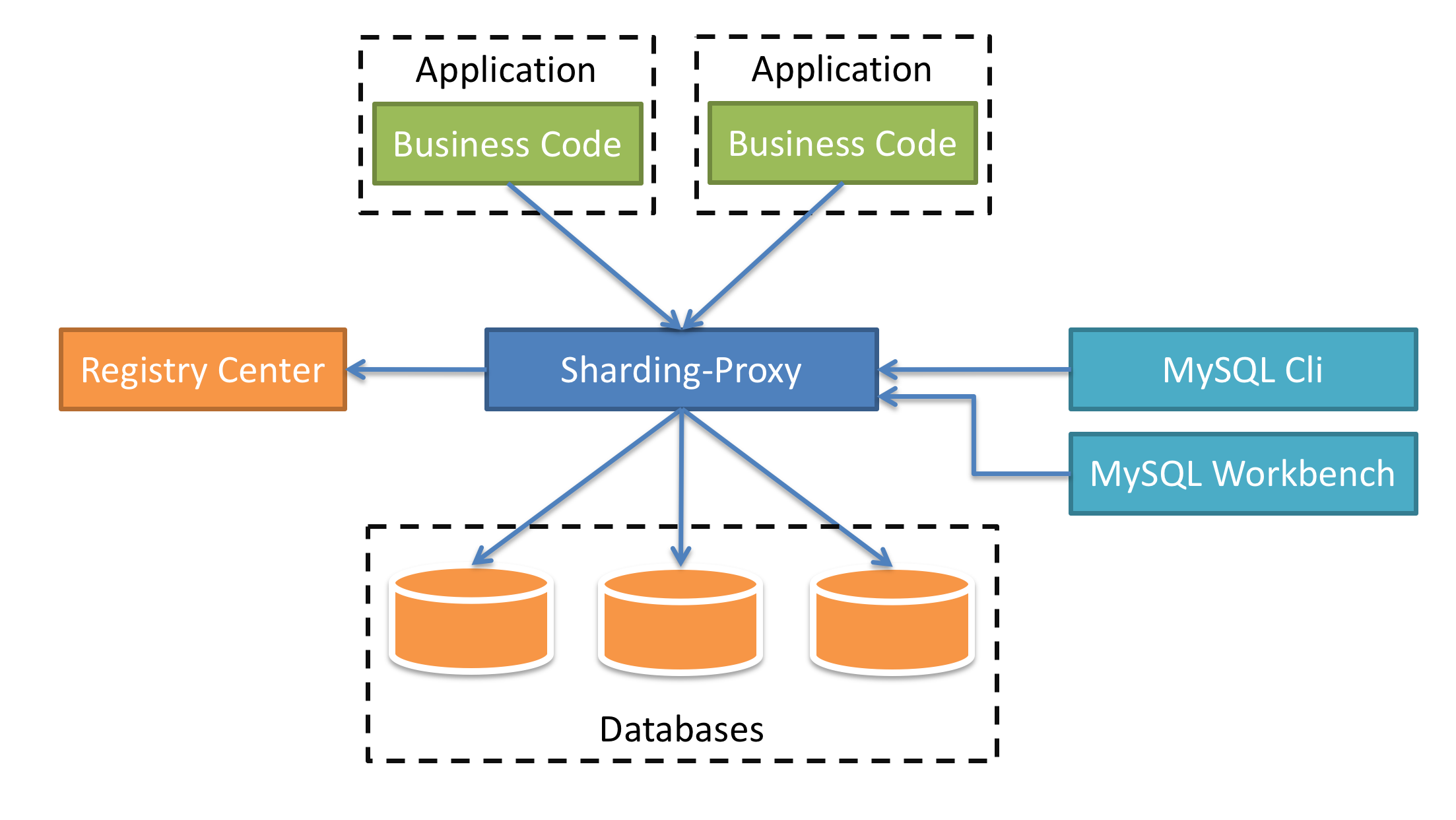
从另一个角度考虑,如果数据库要支持多个语言访问,Embedded-SDK模式就需要新的支持该语言的SDK;而Proxy模式则不用,只用标准JDBC连接即可。
Vitess特性
Vitess架构

类似于Kubernetes, Viteness的组件分为Control Plane(控制切面)和Data Plane(数据切面两部分)。
一般Control Plane承载元数据存储、调度和管理、监控等功能,而Data Plane直接对上游提供服务,承载业务流量。
| 名称 | 说明 |
|---|---|
| VTGate | Vitess网关,将流量路由到VTTablet |
| VTTablet | 一个tablet由一个mysqld进程和一个对应的vttablet进程组成,一般运行在一个机器上。 |
| VTAdmin | Vitess Web管理界面 |
| vtctld | 用来访HTTP服务器,通常用来诊断集群的状态;也为vtctlclient提供服务 |
| vtorc | vtorc即(Vitess Orchestration), 根据https://github.com/openark/orchestrator改写。主要实现mysql实例集群的复制和高可用 |
其他比较重要的概念
| 名称 | 说明 |
|---|---|
| Keyspace | keyspace是一个逻辑上的数据库。如果不使用sharding, 它会直接映射到数据库名称; 使用sharding时,它会映射到多个mysql分库。 |
| Shard | Shard是keyspace的子集,通常是一个MySQL主库和多个MySQL从库 |
| VSchema | VSchema用来定义如何分库分表,即如何数据如何存储在keyspaces和shards。 通在路由查询和重新分片的时候用到 |
| Cell | Cell是一组servers的集合,通常是在一个可用区(availability zone)里面,与其他的cell冗灾。每一个cell有自己的拓扑服务,如上面的架构图。 |
TODO 多个cell的场景
本地运行官方示例
Vitess官方提供了Vitess Operator for Kubernetes 教程,通过Kubernetes起一个近似生产环境的集群。
官方示例里用的是minikube, 这里换成microk8s,这样无论是在ubuntu桌面还是服务端,我们都可以完成运行一个类似环境集群的目的。
集群搭建
- microk8s安装
# 使用snap安装microk8s
sudo snap install microk8s

# 根据microk8s教程,增加一个mkctl别名
alias mkctl="microk8s kubectl"

# 启用必要的插件,不然vitess operator无法正常运行
microk8s enable dns hostpath-storage ingress

# 如果有防火墙的问题,拉去不了镜像,可以通过以下方式设置代理; 这里我们使用socks5代理
https_proxy=socks5://192.168.50.1:1080 microk8s.ctr image pull registry.k8s.io/ingress-nginx/controller:v1.5.1
部署集群
git clone https://github.com/vitessio/vitess
cd vitess/examples/operator

mkctl apply -f operator.yaml
mkctl apply -f 101_initial_cluster.yaml
问题排查命令
# 查看crd
mkctl get crd

# 查看所有资源名称
mkctl api-resources --verbs=list -o name

# 查看VitessCluster集群类型资源,即通过Vitess Operator定义的资源
mkctl get VitessCluster
启动成功后Pod的状态

运行示例
上面运行的部署过程中,我们已经运行了一个keyspace commerce。
然后创建以下三个表
# get service ports
# mkctl get services
vtctldclient --server=10.152.183.186:15999 ApplyVSchema --vschema-file="vschema_commerce_initial.json" commerce
vtctldclient --server=10.152.183.186:15999 ApplyVSchema --vschema-file="vschema_commerce_initial.json" commerce

# connect to vgate
mysql -h 10.152.183.51 -u user
# 商品信息
create table product(
  sku varbinary(128),
  description varbinary(128),
  price bigint,
  primary key(sku)
);
# 顾客信息
create table customer(
  customer_id bigint not null auto_increment,
  email varbinary(128),
  primary key(customer_id)
);
# 订单信息
create table corder(
  order_id bigint not null auto_increment,
  customer_id bigint,
  sku varbinary(128),
  price bigint,
  primary key(order_id)
);
分表
插入数据
mysql -h 10.152.183.51 -u user < ../common/insert_commerce_data.sql
mysql -h 10.152.183.51 -u user --table < ../common/select_commerce_data.sql
在这个例子中,我们将增加一个customer keyspace, 并把表customer corder 移过去。
查看当前的表
qtopierw@kylaptop:~/workspace/projects/vitess/examples/operator$ mysql -h 10.152.183.51 -u user -e "show vitess_tablets"
+-------+----------+-------+------------+---------+------------------+-------------+----------------------+
| Cell  | Keyspace | Shard | TabletType | State   | Alias            | Hostname    | PrimaryTermStartTime |
+-------+----------+-------+------------+---------+------------------+-------------+----------------------+
| zone1 | commerce | -     | PRIMARY    | SERVING | zone1-2469782763 | 10.1.26.162 | 2023-05-18T01:01:54Z |
| zone1 | commerce | -     | REPLICA    | SERVING | zone1-2548885007 | 10.1.26.164 |                      |
+-------+----------+-------+------------+---------+------------------+-------------+----------------------+
创建新的tablet
mkctl apply -f 201_customer_tablets.yaml
qtopierw@kylaptop:~/workspace/projects/vitess/examples/operator$ mysql -h 10.152.183.51 -u user -e "show vitess_tablets"
+-------+----------+-------+------------+---------+------------------+-------------+----------------------+
| Cell  | Keyspace | Shard | TabletType | State   | Alias            | Hostname    | PrimaryTermStartTime |
+-------+----------+-------+------------+---------+------------------+-------------+----------------------+
| zone1 | commerce | -     | PRIMARY    | SERVING | zone1-2469782763 | 10.1.26.162 | 2023-05-18T01:01:54Z |
| zone1 | commerce | -     | REPLICA    | SERVING | zone1-2548885007 | 10.1.26.164 |                      |
| zone1 | customer | -     | PRIMARY    | SERVING | zone1-1250593518 | 10.1.26.169 | 2023-06-11T09:20:05Z |
| zone1 | customer | -     | REPLICA    | SERVING | zone1-3778123133 | 10.1.26.168 |                      |
+-------+----------+-------+------------+---------+------------------+-------------+----------------------+
qtopierw@kylaptop:~/workspace/projects/vitess/examples/operator$ vtctlclient --server=10.152.183.186:15999 MoveTables -- --source commerce --tables 'customer,corder' Create customer.commerce2customer
Waiting for workflow to start:

Workflow started successfully with 1 stream(s)

The following vreplication streams exist for workflow customer.commerce2customer:

id=1 on -/zone1-1250593518: Status: Copying. VStream Lag: 0s.
检查差异
qtopierw@kylaptop:~/workspace/projects/vitess/examples/operator$ vtctlclient --server=10.152.183.186:15999 VDiff -- --verbose  customer.commerce2customer show last

VDiff Summary for customer.commerce2customer (b2f90a61-083a-11ee-9eb3-e6cc5c415f83)
State:        completed
RowsCompared: 10
HasMismatch:  false
StartedAt:    2023-06-11 09:31:09
CompletedAt:  2023-06-11 09:31:10

Table corder:
	State:            completed
	ProcessedRows:    5
	MatchingRows:     5

Table customer:
	State:            completed
	ProcessedRows:    5
	MatchingRows:     5

Use "--format=json" for more detailed output.
切流
qtopierw@kylaptop:~/workspace/projects/vitess/examples/operator$ vtctlclient --server=10.152.183.186:15999 MoveTables -- SwitchTraffic customer.commerce2customer
SwitchTraffic was successful for workflow customer.commerce2customer
Start State: Reads Not Switched. Writes Not Switched
Current State: All Reads Switched. Writes Switched
完成
qtopierw@kylaptop:~/workspace/projects/vitess/examples/operator$ vtctlclient --server=10.152.183.186:15999 MoveTables -- Complete customer.commerce2customer
Complete was successful for workflow customer.commerce2customer
Start State: All Reads Switched. Writes Switched
Current State: Workflow Not Found
完成后,路由规则改了。尝试在旧的keyspace里读customer就会报错
qtopierw@kylaptop:~/workspace/projects/vitess/examples/operator$ mysql -h 10.152.183.51 -u user < ../common/select_commerce_data.sql
Using commerce
Customer
ERROR 1146 (42S02) at line 4: target: commerce.-.primary: vttablet: rpc error: code = NotFound desc = Table 'vt_commerce.customer' doesn't exist (errno 1146) (sqlstate 42S02) (CallerID: user): Sql: "select customer_id, email from customer", BindVars: {}
分库分表的案例
我们假设一个业务场景,我们服务的用户在两个不同的国家,用户数量很大且考虑到业务增长的需求,所以需要用到分库分表的方案。
为了从业务上区分这两个国家,我们将用两个不同的租户tenantA, tenantB为用户提供服务。
但同时因为合规的要求,我们需要将两个不同国家的数据分别存储当地的数据中心。
https://vitess.io/docs/16.0/user-guides/configuration-advanced/region-sharding/
关键技术
BuildKeyspaceSchema
https://github.com/vitessio/vitess/blob/main/go/vt/vtgate/vindexes/vschema.go#L268
KeyspaceSchema定义
// KeyspaceSchema contains the schema(table) for a keyspace.
type KeyspaceSchema struct {
	Keyspace *Keyspace
	Tables   map[string]*Table
	Vindexes map[string]Vindex
	Views    map[string]sqlparser.SelectStatement
	Error    error
}
Vindexes数据也存储在toposerver中
Route
